
LA GARD 700 SERIES QUICK START GUIDE SERVICEABLE KEYPAD
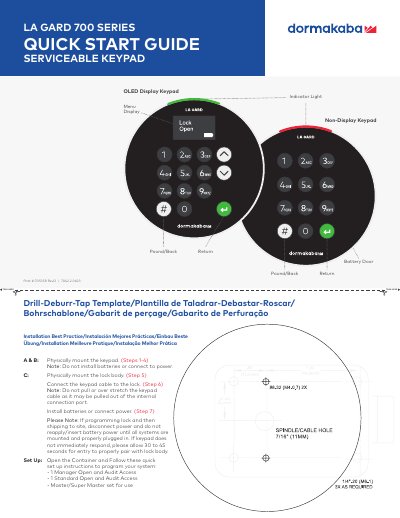
This quick start guide covers the LA GARD 700 Series serviceable keypad in both the OLED display keypad and non-display keypad versions, models 701-705. It walks through physically mounting the keypad, mounting the lock body, connecting the keypad cable to the lock and then installing batteries or connecting power, with a note to allow 30 to 45 seconds for the entry to pair with the lock body.
Setup instructions list 1 Manager open and audit access, 1 Standard open and audit access, and Master/Super Master set for use. Separate step sequences are given for the display keypad and the non-display keypad, covering installing the lock, changing the master combo, adding a user and opening and changing a combo. The guide also includes a 700 Basic non-display keypad section for the manager/user/super master reset code, with a default combination of 123456. Detailed operation and installation instructions are directed to www.dormakaba.us.
| Model range | 701-705 |
|---|---|
| Keypad versions | OLED Display Keypad and Non-Display Keypad |
| Default combination (700 Basic non-display keypad) | 123456 |
| Pairing wait time after power up | 30 to 45 seconds |
The default combination is 123456.
Select "OPEN LOCK" in the menu.
Allow 30 to 45 seconds for the entry to properly pair with the lock body.
The guide refers to www.dormakaba.us for detailed operation and installation instructions.