
The Dell laptop user manual introduces the various components of the laptop and how to use it.
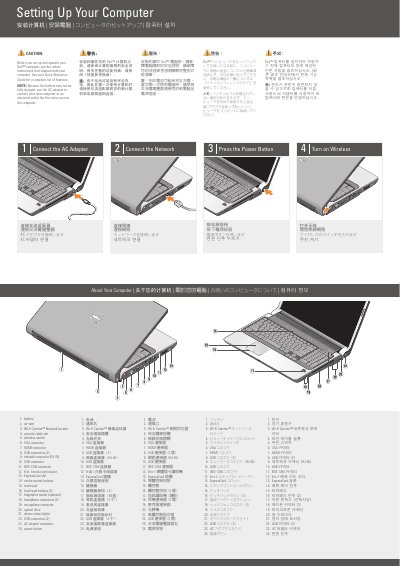
The document is a short setup guide for a Dell laptop. It gives four setup steps: connect the AC adapter, connect the network, press the power button, and turn on wireless. It also includes an optional wireless network diagram and a Finding Answers section pointing to the Quick Reference Guide and support.dell.com.
A labeled diagram identifies 24 parts and ports, including the battery, air vent, Wi-Fi Catcher Network Locator, security cable slot, wireless switch, VGA and HDMI connectors, USB connectors, network connector, IEEE 1394 connector, 8-in-1 media card reader, ExpressCard slot, touch pad, fingerprint reader, headphone and microphone connectors, optical drive, device status lights, AC adapter connector, and power button.
| Wi-Fi Catcher Network Locator | 1 |
|---|---|
| VGA connector | 1 |
| HDMI connector | 1 |
| USB connectors | 2 |
| Network connector | RJ-45 |
| IEEE 1394 connector | 1 |
| Media card reader | 8-in-1 |
| Fingerprint reader | Optional |
| Headphone connectors | 2 |
| AC adapter connector | 1 |
It says to see the safety instructions that shipped with the computer and the Quick Reference Guide for a complete list of features.
The battery may not be fully charged, so the guide says to use the AC adapter to connect the computer to an electrical outlet.
See the Quick Reference Guide; if you do not have a printed copy, go to support.dell.com.
It shows Internet service, a cable or DSL modem, and a wireless router.