
The DellTM Digital Jukebox is a versatile portable music player that features:
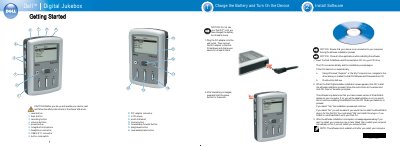
This getting started guide for the Dell DJ Digital Jukebox walks through the first steps for the player. It lists the numbered parts of the device, including the reset button, back and recording buttons, volume and power buttons, integrated microphone, headphone connector, USB 2.0/1.1 connector, button lock switch, DC adapter connector, LCD screen, scroll dial/select, Home button, forward/skip forward, play/pause and reverse/skip back buttons.
The guide then explains how to charge the battery for at least 6 hours with the DC adapter and how to turn the device on by holding the power button for 2 seconds. It also describes installing the Dell DJ Software and Documentation CD, including what to do if the CD does not run automatically, the MusicMatch plug-in question, and restarting the computer so the software is enabled.
| USB Connector | USB 2.0/1.1 |
|---|---|
| Display | LCD screen |
| Microphone | Integrated microphone |
| Headphone Connector | Headphone connector |
| Minimum Battery Charge Time | At least 6 hours |
Charge the battery for at least 6 hours before using the device.
Press and hold the power button for 2 seconds.
Navigate to the drive where the CD was loaded and double-click start.exe.
Yes. The software is not enabled until after you restart your computer.