
The Dell™ OptiPlex™ All-in-One Stand is lightweight, easy to install, height-adjustable, and available in a variety of colors.
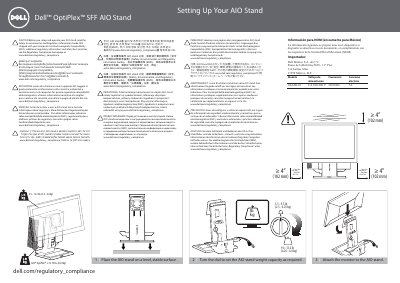
This guide explains how to set up the Dell OptiPlex SFF AIO stand. It covers placing the stand on a level surface, adjusting the dial for the stand weight capacity, attaching the monitor, sliding the computer chassis into the stand, and locking it in place.
It also includes cable routing and connection steps, installation of security accessories, NOM information for Mexico, and a caution to read the Safety, Environmental, and Regulatory Information Guide shipped with the computer before setup and operation.
| Stand weight capacity range | 5.5 - 13.2 lbs (2.5 - 6.0 kg) |
|---|---|
| Maximum supported computer weight | ≤ 13.75 lbs (6.24 kg) |
| Minimum clearance | ≥ 4” (102 mm) |
| Power supply voltage | CA 100-240 V |
| Power supply frequency | 50/60 Hz |
| Power consumption | 7A |
| Model | 1KAIO-01 |
| Mounting screw diameter | Ø 3 mm - 8 mm |
Read the Safety, Environmental, and Regulatory Information Guide that shipped with the computer before setup and operation.
Turn the dial on the stand to set the weight capacity as required.
Slide the computer chassis into the AIO stand, then slide the switch to lock the computer to the stand.
Leave sufficient slack and tuck the monitor cable into the cable channel.