
The document provides instructions on how to use a Dell computer, including how to connect the AC adapter, how to connect the modem and network, and how to turn on the power.
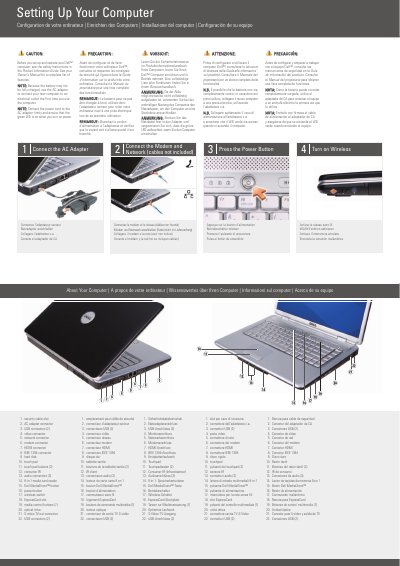
This Dell computer quick start guide provides basic setup instructions in multiple languages. It covers connecting the AC adapter, modem and network, pressing the power button, and turning on wireless.
A labeled diagram identifies computer connectors including USB, HDMI, network, modem, and media card reader. The guide also outlines an optional wireless network setup and refers users to the Owner's Manual and support.dell.com for additional help.
| USB connectors | 2 |
|---|---|
| Audio connectors | 3 |
| Media card reader | 8-in-1 |
| Touch pad buttons | 2 |
Use the AC adapter because the battery may not be fully charged.
See the Owner's Manual or visit support.dell.com.
Ensure the green LED is on.