
The Dell™ Dimension™ 9150 Owner's Manual describes the features and specifications of the Dell™ Dimension™ 9150.
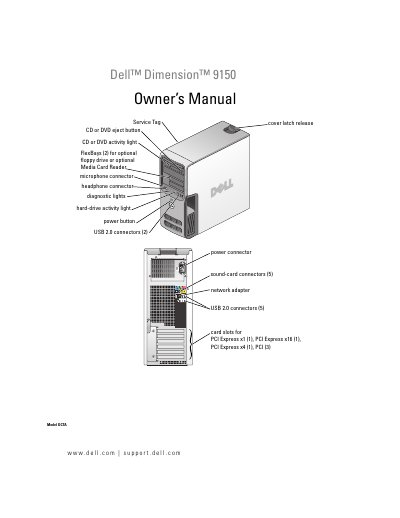
This manual provides instructions for setting up and using the Dell Dimension 9150 desktop computer. It includes information on connecting peripherals, configuring network and display settings, power management, and using optional features such as RAID and Intel Viiv technology.
The document also details troubleshooting steps for common hardware and software problems, diagnostic tools, and procedures for removing and installing internal components such as memory, drives, and expansion cards. An appendix lists technical specifications, system setup options, and support information.
| Processor type | Intel® Pentium® 4 Socket-T with Hyper-Threading technology |
|---|---|
| Cache | 1 MB or 2 MB |
| Memory type | dual-channel 400-, 533-, and 667-MHz DDR2 |
| Memory connectors | four |
| Memory capacities | 256 MB, 512 MB, or 1 GB |
| Minimum memory | 512 MB |
| Maximum memory | 4 GB |
| BIOS address | F0000h |
| Chipset | Intel 945P |
| DMA channels | eight |
| Interrupt levels | 24 |
| BIOS chip (NVRAM) | 4 Mb |
| Network interface | Integrated 10/100 communication |
| System clock | 800- or 1066-MHz data rate |
| Video type | PCI Express |
| Audio type | Internal 7.1 channel or PCI option cards |
The Dimension 9150 uses an Intel Pentium 4 Socket-T processor with Hyper-Threading technology.
The system supports a maximum of 4 GB of DDR2 memory across four memory connectors.
Install memory modules in matched pairs in connectors DIMM_1 and DIMM_2, or add a second matched pair in DIMM_3 and DIMM_4.
The computer uses a PCI Express video interface.