
The purpose of this guide is to assist Attorneys for Children in accessing the Vendor Self-Service Portal so they can maintain their Vendor information and view voucher payment information.
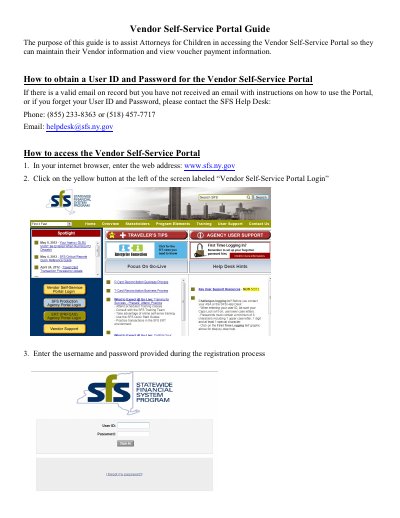
This document serves as a guide for Attorneys for Children to access and use the Vendor Self-Service Portal. It provides instructions on obtaining a User ID and Password, including contact details for the SFS Help Desk if credentials are forgotten. The guide details the steps to log in via the web address www.sfs.ny.gov and navigate the portal interface.
If you have a valid email but have not received instructions, or if you forget your credentials, please contact the SFS Help Desk at (855) 233-8363 or (518) 457-7717.
Enter the web address www.sfs.ny.gov in your internet browser and click the yellow button labeled 'Vendor Self-Service Portal Login'.
Click the arrow next to 'Maintain Supplier Information', select 'Maintain Addresses', and click 'Add a New Address' to enter details.
The guide lists resources such as the SFS Help Desk, scheduled Training classes, and online self-serve training options.