
The PHILCO PLD3213HT is a 32-inch HD LED TV that uses a HISENSE panel with a resolution of 1366x768 and supports a 60Hz refresh rate. The TV is equipped with an RSAG7.820.5253 motherboard and an RSAG7.820.5268 power board.
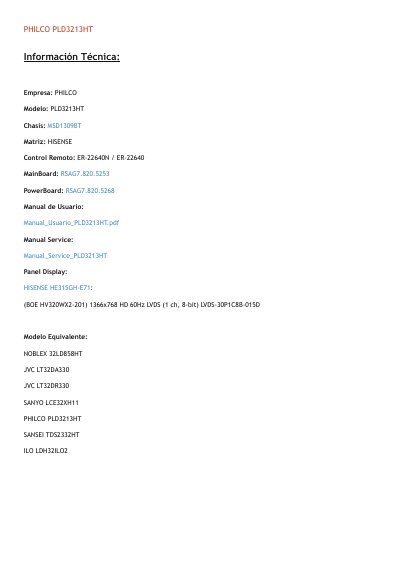
This service document covers the Philco PLD3213HT LCD TV, including its chassis, main board, power board, panel, and remote control. It provides technical reports for TV lockup, CATV tuning issues, and firmware installation.
It also documents how to enter the service or factory menu, update firmware from a USB drive, reset the TV to factory settings, and change the on-screen brand logo. This manual is written in Spanish.
| Chasis | MSD1309BT |
|---|---|
| Matriz | HISENSE |
| Control Remoto | ER-22640N / ER-22640 |
| MainBoard | RSAG7.820.5253 |
| PowerBoard | RSAG7.820.5268 |
| Panel Display | HISENSE HE315GH-E71 : (BOE HV320WX2-201) |
| Resolución | 1366x768 HD 60Hz |
| Interfaz de panel | LVDS (1 ch, 8-bit) LVDS-30P1C8B-015D |
| Memoria N50 | AT24C32A (EEPROM) |
| Memoria N55 | MX25L3205 (FLASH) |
Encienda el televisor, pulse MENU, seleccione SONIDO -> BALANCE con BALANCE en "0", sin pulsar OK. Ingrese la secuencia 1 9 6 9, espere que aparezca una "M" y pulse MENU de nuevo.
Copie el archivo descomprimido al pendrive, insértelo en un puerto USB del TV y acceda al menú de servicio. Seleccione FUNCTION -> ACTUALIZAR FIRMWARE y pulse Cursor Derecha.
Pulse MENU, vaya a CONFIGURACIÓN -> RESTAURAR PARÁMETROS FÁBRICA y pulse ACEPTAR. El televisor se reiniciará y será necesario realizar la configuración inicial.
Ingrese al menú de servicio y vaya a Factory Menu > Function > Logo. Use las flechas izquierda o derecha para seleccionar la marca, o elija Welcome como logo genérico o Apagado.