
Portable CD player that supports multiple power supply methods, including two AA batteries or a Micro USB 5V adapter (both not included).
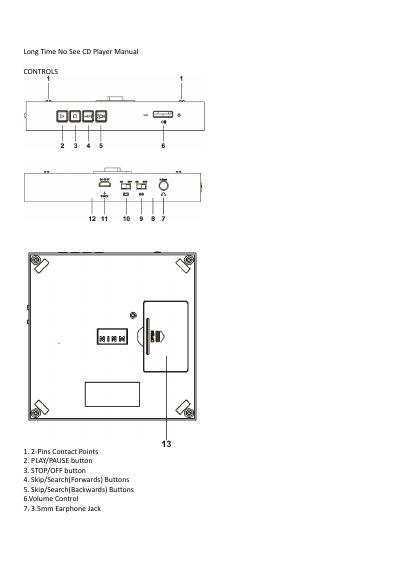
This is the user manual for the Long Time No See portable CD player, a small player that runs on two AA batteries or a Micro USB 5V adaptor (neither included). The manual numbers the controls on the unit, from the 2-pin contact points and Play/Pause, Stop/Off and skip/search buttons to the volume control, 3.5mm earphone jack, power and Bluetooth LEDs, Bluetooth switch, battery charging switch, Micro USB charging jack and battery compartment cover.
Operating instructions explain how to load a CD, play and pause it, skip or search forward and backward, stop and change discs. A separate section describes pairing the player with Bluetooth speakers or headphones using the BT ON/OFF switch, and another covers charging rechargeable batteries through the Micro USB jack with the charging switch set to ON. The manual closes with earphone safety warnings, care and maintenance advice, and an FCC warning and RF exposure statement.
| Power source | Two AA batteries or Micro USB 5V adaptor (both not included) |
|---|---|
| Earphone jack | 3.5mm |
| Charging input | Micro USB |
| Bluetooth LED | Blue LED, flashing while connecting and lit when connected |
| Charging LED | White LED, lit while charging and off when fully charged |
| Bluetooth connection time | Up to 10 seconds |
Power on your Bluetooth speakers or headphones, then slide the BT ON/OFF switch to the ON position. The blue BT LED flashes while connecting and stays lit once the connection is complete.
It runs on two AA batteries, or on a Micro USB 5V adaptor. Never mix old and new batteries or different battery types.
Connect a Micro USB 5V adaptor to the Micro USB charging jack and slide the Battery Charging switch to ON; the white charging LED lights while charging and goes off when the battery is full.
Press the forward or backward skip/search button one or more times to skip to a track, or press and hold it to fast forward or scroll backward in the current track.