
GDRC-MP3_Player(V1.0) is a single-chip MP3 design, development and learning board launched by Nanjing Taoxing Electronics. The board uses NXP's low-voltage and low-power LPC932A1 as the control core, SD card as the song storage medium, and VS1003B chip for music decoding and playback.
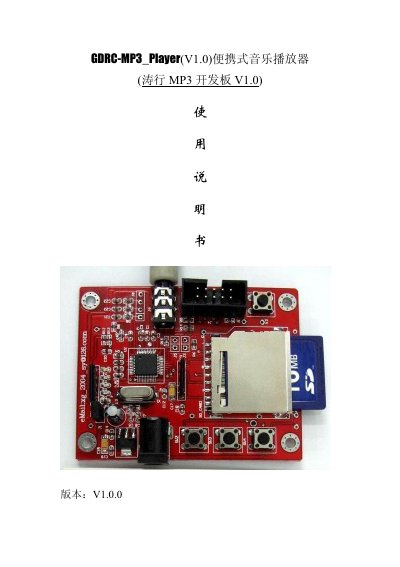
The GDRC-MP3_Player (V1.0), also called the Taoxing MP3 development board V1.0, is a single-chip MP3 design, development and learning board from Nanjing Taoxing Electronics. An NXP LPC932A1 microcontroller is the control core, an SD card holds the songs, and the VS1003B audio decoder chip handles decoding and playback. The board plays MP3, WMA, WAV and MIDI files at up to 320 Kbps and runs from a 3.6-9.1 V DC supply.
This Chinese user manual describes the board's interfaces and controls: the function keys, power input and power switch, the four indicator LEDs, the headphone output, the program download connector and the reset button. It then gives the whole-machine operating procedure, the rules for where music files must be stored on the SD card, ICP and ISP programming of the LPC932A1, a list of frequently asked questions and contact details. This manual is written in Chinese.
| Supply voltage | 3.6-9.1 V DC |
|---|---|
| Supported audio formats | MP3, WMA, WAV, MIDI |
| Maximum playback bitrate | 320 Kbps |
| Control microcontroller | NXP LPC932A1 |
| Audio decoder chip | VS1003B |
| DAC resolution | 18 bit |
| Dynamic range | 90 dB |
| Signal-to-noise ratio | 85 dB |
| Storage media | 1M-2G SD or MMC card, FAT12/FAT16 |
| Headphone output | 3.5 mm stereo, 16-32 ohm headphones |
The kit contains one tested development board, one battery box and one CD with the circuit schematic in PDF, the playback source code and related tool software.
All music files must be put in a subdirectory named “播放音乐” under the root directory of the SD card; other files and folders can go anywhere.
For beginners ICP is recommended, to avoid an unsuccessful ISP operation that leaves the board unable to connect to the Flash Magic software.
A long press on SW2 switches the system to volume control mode, and another long press switches it back to track selection.