
Installation instructions for the manual call point models MCP1..,MCP2..,MCP3..,MCP4.. produced by KAC ALARM COMPANY LIMITED.
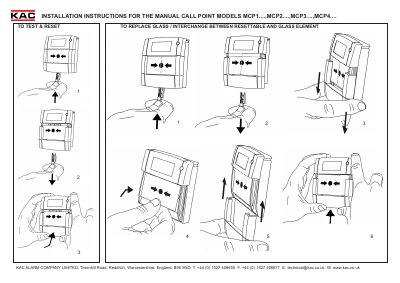
This document gives installation instructions for KAC manual call point models MCP1, MCP2, MCP3 and MCP4. It covers wiring, connection details, dimensions, technical data and important installation notes.
The call points are available in several colours and use an MCP code whose final digits indicate colour, component values, mounting options and element type.
| Maximum voltage | 30 VDC max |
|---|---|
| Maximum current | 2 A max |
| Ingress protection | IP24D |
| Operating temperature | -10 C to 55 C |
The maximum operating voltage is 30 VDC.
The maximum current is 2 A.
It indicates MCP colour, component values, mounting options and element type.
It means MCP1A, Red, 470R, Surface, Flexible Element.