
The Tuff TTL is a wireless flash trigger that allows for off-camera flash, and supports high-speed sync and second curtain sync. It uses a system called “Digital Channel Matching” to ensure a reliable connection between the transmitter and receiver.
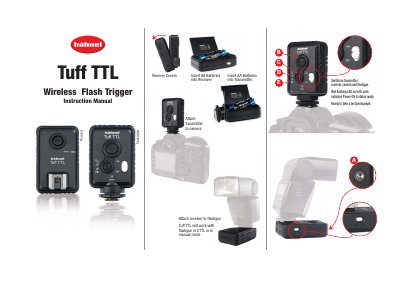
The Hahnel Tuff TTL is a wireless flash trigger with a transmitter and receiver. The manual shows how to insert AA batteries, attach the transmitter to a camera and the receiver to a flashgun, then switch on the units; red flashing LEDs on both units indicate power on and ready status.
It covers Normal, High Speed Sync and Second-Curtain Sync modes, Digital Channel Matching, flash exposure compensation, 5V USB power, troubleshooting, and software updates for the Canon 60D using a Windows PC.
| Tripod socket | 1/4 inch |
|---|---|
| Battery type | AA batteries |
| Power source | 5V USB mains source via Mini USB cable |
| Flash modes | ETTL or manual |
Insert AA batteries, attach the transmitter to the camera and the receiver to the flashgun, then switch on all units. Red flashing LEDs on both units indicate power on and ready status.
Turn off both Tuff TTL units, hold the button and turn on the transmitter until the blue LED lights. Repeat for the receiver, then turn both units off and on again.
It can be powered from a 5V USB mains source using a Mini USB cable.
Press the camera shutter release once to re-establish the wireless connection.