
User Manual Energenie MiHome Gateway The Gateway provides the communications between all your MiHome devices and the internet.
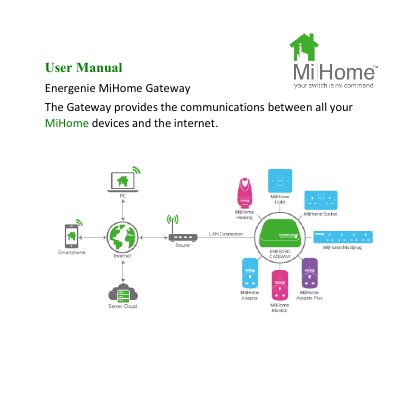
The Energenie MiHome Gateway (model MIHO001) is a radio gateway that provides communications between MiHome devices and the internet. The manual explains connecting it to a home router with the supplied Ethernet and microUSB cables, powering it from the PSU, and checking the front light for connection status.
It also covers first-time setup through the MiHome Android/iPhone app or the mihome4u.co.uk website, registering the Gateway with its 10 digit code, firmware updates, and pairing Control, Monitor, and Control & Monitor adapters. It lists reception range guidance and includes declaration, caution, and notice sections.
| Model | MIHO001 |
|---|---|
| Device type | Radio Gateway |
| Power connection | microUSB |
| Network connection | Ethernet |
| Adapter control range after pairing | At least 25 metres in open air |
Plug one end of the Ethernet cable into the Gateway socket and the other end into a free Ethernet socket on your home router. Power the Gateway through its microUSB socket using the PSU and cable.
The light on the front illuminates orange and then becomes steady green when the Gateway is connected.
It may take up to 20 seconds for this to happen.
Go to mihome4u.co.uk, create an account, select Manage Devices, and register the Gateway using the 10 digit key code.