
This document is about Apple Watch Guide, it introduces the features and functions of Apple Watch.
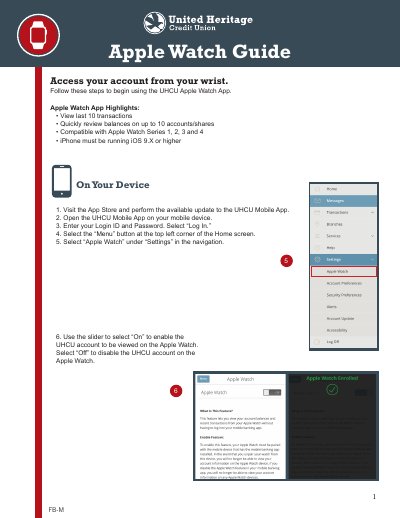
The UHCU Apple Watch Guide provides setup instructions for the UHCU Mobile App on Apple Watch Series 1, 2, 3, and 4. Users can view the last 10 transactions and review balances on up to 10 accounts or shares from their wrist.
First, update the UHCU Mobile App, log in, and select Apple Watch under Settings in the menu. After installing the app through the Watch App, users can swipe to view balances, select an account for transaction history, and press and hold to refresh.
| Compatible Apple Watch models | Apple Watch Series 1, 2, 3 and 4 |
|---|---|
| Required iOS version | iOS 9.X or higher |
| Transaction history | Last 10 transactions |
| Accounts or shares | Up to 10 accounts/shares |
The UHCU Apple Watch App is compatible with Apple Watch Series 1, 2, 3 and 4.
The iPhone must be running iOS 9.X or higher.
Balances on up to 10 accounts or shares can be reviewed.
Press and hold to perform a refresh if the balance or history does not immediately update.