
The document describes the network settings of the BlackBerry phone, including manual network selection and dual card dual standby settings.
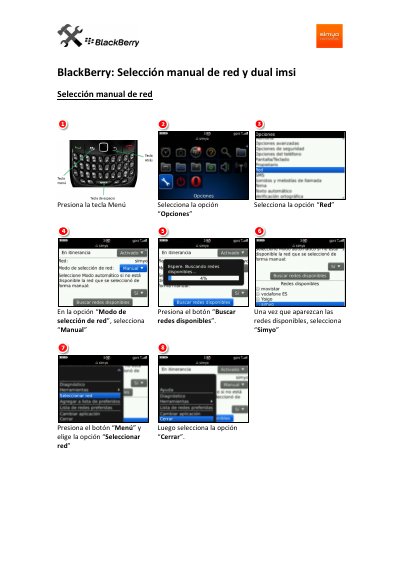
This Spanish-language guide for a BlackBerry phone explains how to change the network selection mode from automatic to manual. It shows how to open Options, search for available networks, select Simyo, and close the options screen.
The second part covers dual IMSI setup through the Simyo service. It describes opening Roaming Service, choosing National, then selecting Network Selection and Manual. This manual is written in Spanish.
Press the Menu key, open Options, set the network selection mode to Manual, search for available networks, and select Simyo.
Select Automatic mode so the phone can use an available network.
Open the Simyo service, select Roaming Service and press accept, then choose National and continue to Network Selection.