
This manual describes how to set up the Eduroam network on a BlackBerry phone.
This Spanish guide explains how to configure a BlackBerry Curve 8900 to connect to the eduroam Wi-Fi network at Universidad Católica de Valencia. It states that the procedure was tested with a BlackBerry Curve 8900 and may not work with other phone software versions.
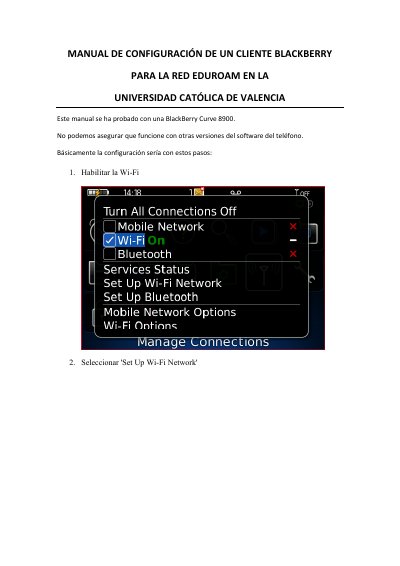
The steps cover enabling Wi-Fi, opening Set Up Wi-Fi Network, scanning for networks, selecting eduroam, entering a university username in @ucv.es or @alumnos.ucv.es format, choosing PEAP security, selecting the Comodo AddTrust External CA Root certificate, using EAP-MS-CHAP v2, connecting, and saving the eduroam profile. This manual is written in Spanish.
| Tested phone model | BlackBerry Curve 8900 |
|---|---|
| Wi-Fi security type | PEAP |
| Inner link security | EAP-MS-CHAP v2 |
| CA certificate | Comodo AddTrust External CA Root |
| Username format | @ucv.es or @alumnos.ucv.es |
The guide was tested with a BlackBerry Curve 8900.
The security type should be PEAP.
EAP-MS-CHAP v2 is selected.
Use a university username in @ucv.es or @alumnos.ucv.es format.