
This guide will take you step by step through the installation of your new wheel adapter.
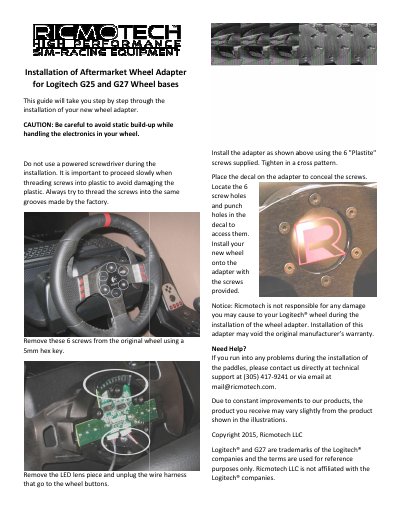
This Ricmotech guide explains how to install an aftermarket wheel adapter for Logitech G25 and G27 wheel bases. It warns against static build-up, powered screwdrivers, and fast screw threading into plastic.
The steps include removing six original wheel screws with a 5mm hex key, removing the LED lens, unplugging the wheel-button wire harness, installing the adapter with six Plastite screws, applying a decal, and mounting the new wheel. The guide also notes that installation may void the original manufacturer’s warranty and gives Ricmotech support contact details.
| Compatibility | Logitech G25 and G27 wheel bases |
|---|---|
| Mounting screws | 6 Plastite screws |
| Screw tightening pattern | Cross pattern |
| Included decal | Decal to conceal screws |
| Required tool | 5mm hex key |
It is an aftermarket wheel adapter for Logitech G25 and G27 wheel bases.
No, the guide says do not use a powered screwdriver during installation.
The guide says installation of this may void the original manufacturer’s warranty.
Ricmotech technical support can be reached at (305) 417-9241 or [email protected].