
This document describes the AAT Mobile (Android) User Guide, including how to download and use it.
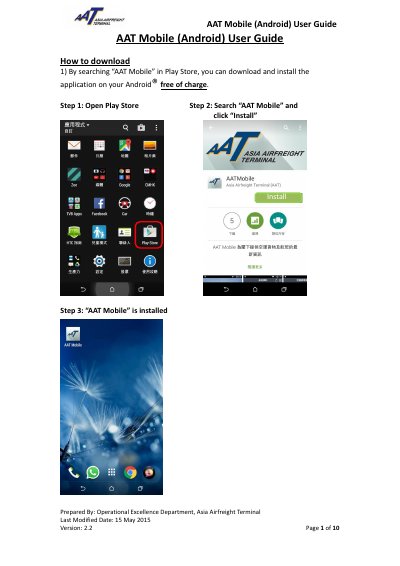
This user guide from the Operational Excellence Department of Asia Airfreight Terminal explains how to install and use the AAT Mobile application on an Android device. Version 2.2 of the guide was last modified on 15 May 2015. It starts with downloading the app from Play Store by searching "AAT Mobile" and installing it free of charge.
The guide then walks through the main functions of the app: Flight Schedule for arrival and departure flights of yesterday, today and tomorrow; Air Waybill for checking import and export shipment status, including registration of up to 10 AWB numbers, import arrival/RCF/delivery details, storage charge enquiry, export RCS and departure flight details, and ready-for-collection reminder notifications; Settings for language, AWB auto clearance and news notification; and the About page with contact information, news and FAQ.
| Supported platform | Android |
|---|---|
| Language options | English, Traditional Chinese, Simplified Chinese |
| AWB number length | 11 digits |
| Maximum registered AWBs | 10 |
| Default AWB record retention | 2 months |
| AWB Auto Clearance options | 1 / 2 / 5 / 7 / 14 / 30 Days |
Search "AAT Mobile" in Play Store, then click "Install"; the application can be downloaded and installed on your Android device free of charge.
You can register a maximum of 10 AWB numbers by clicking "+" and entering a valid 11-digit AWB number.
With the default setting of no auto clearance, the AWB record is kept for 2 months in your Android device from the date of registration.
Flight Schedule lets you check arrival and departure flights for yesterday, today and tomorrow.