
This document is a guide on how to install a Waterstone Contemporary 35mm Cartridge. The guide provides step-by-step instructions and is accompanied by illustrations.
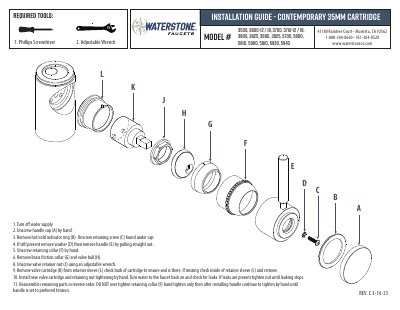
This one-page guide explains how to replace the valve cartridge in Waterstone Contemporary 35mm cartridge faucets. It identifies required tools and gives numbered steps for removing the handle, cartridge, and retaining parts, installing the new cartridge, checking for leaks, and reassembling.
| Model number | 41180 |
|---|---|
| Cartridge size | 35 mm |
| Compatible faucet models | 3500, 3600-12/18, 3700, 3710-12/18, 3800, 3825, 3900, 3925, 5700, 5800, 5810, 5900, 5910, 5930, 5940 |
| Required tools | Phillips screwdriver and adjustable wrench |
| Retaining collar tightening | Hand tighten only |
A Phillips screwdriver and an adjustable wrench.
Check inside the retainer sleeve and remove it.
Tighten the retaining nut until the leaking stops.
Hand tighten only; do not over tighten it.