
66229900W W Touchscreen Home Security System Quick User Setup Guide
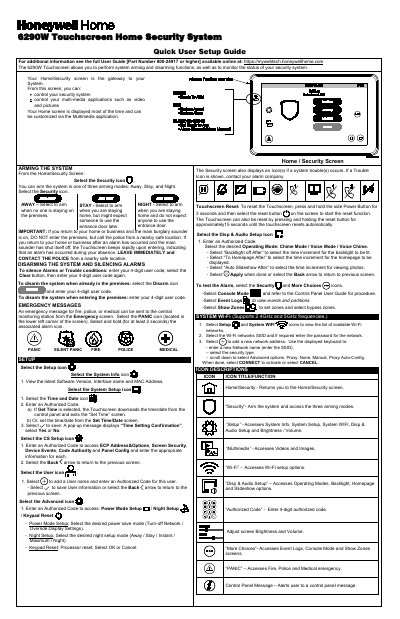
This quick user setup guide covers the Honeywell Home 6290W Touchscreen, which lets you arm and disarm the security system and monitor its status. It explains the Home/Security screen, the three arming modes (Away, Stay and Night), disarming and silencing alarms with a 4-digit user code, and sending fire, police or medical emergency messages from the Emergency screen. Setup sections cover System Info, System Setup (time and date), CS Setup, User, Advanced (Power Mode, Night Setup, Keypad Reset), Display & Audio Setup, System Wi-Fi and the icon descriptions.
The guide also gives routine care instructions and a clean-screen procedure, describes how the fire and carbon monoxide alarm system operates, and includes FCC, ISED and Industry Canada statements, RF exposure warnings and UL notes.
| User code length | 4 digits |
|---|---|
| Clean screen lockout time | 26 seconds |
| 5 GHz Wi-Fi band restriction | 5150-5250 MHz, indoor use only |
| Maximum time delay setting with this keypad | 15 seconds |
From the Home/Security screen, select the Security icon and choose one of the three arming modes: Away, Stay or Night.
Select the Disarm icon and enter your 4-digit user code; if you are entering the premises, just enter your 4-digit user code.
Select the PANIC icon in the lower left corner of the Emergency screen, then select and hold the associated alarm icon for at least 2 seconds.
Select Setup and Disp & Audio Setup, enter your Authorized Code if required, then select the CLEAN SCREEN button to disable the keypad for 26 seconds.