
The Apex2 is a personal air sampling pump with the following features:
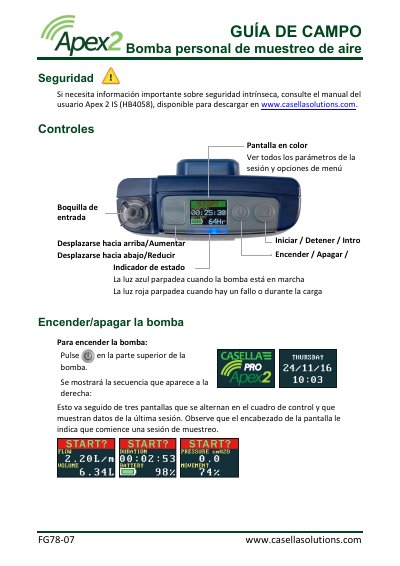
This four-page field guide (GUÍA DE CAMPO, document FG78-07) from Casella explains how to operate the Apex2 personal air sampling pump. It describes the pump's controls, including the color display, status indicator, inlet nozzle and buttons for power, start/stop and menu navigation.
The guide walks through pre-session setup steps such as setting the flow rate, resetting accumulated data and calibrating the pump at the sampling flow rate, then explains how to start and stop a sampling session, apply partial or full keypad locks, and what happens when the pump cannot maintain the target flow rate. For intrinsic safety information it refers readers to the Apex 2 IS user manual (HB4058) available at www.casellasolutions.com. This manual is written in Spanish.
| Flow fault tolerance | 5% for more than 20 seconds triggers automatic stop |
|---|---|
| Retry behavior | Pump attempts restart after one minute |
| Intrinsic safety reference | Apex 2 IS user manual HB4058 |
Pulse el botón en la parte superior de la bomba; se mostrará una secuencia y luego pantallas con datos de la última sesión.
No, la bomba no se puede apagar durante una sesión de muestreo ni cuando se haya definido un temporizador de programa.
Pulse y mantenga pulsado el botón y después púlselo rápidamente 6 veces seguidas; aparecerá el icono de bloqueo total. Solo se puede activar cuando la bomba está en funcionamiento.
Detiene el muestreo automáticamente y muestra el mensaje de reintento bloqueado; tras un minuto intenta reiniciarse y, si falla el número de reintentos definido, termina la sesión con un mensaje de error.