
Instruction manual for non-contact electric pen, introduces the operation methods of the pen such as power on, power off, sensitivity switching, flashlight, AC voltage detection, automatic power off and undervoltage prompt
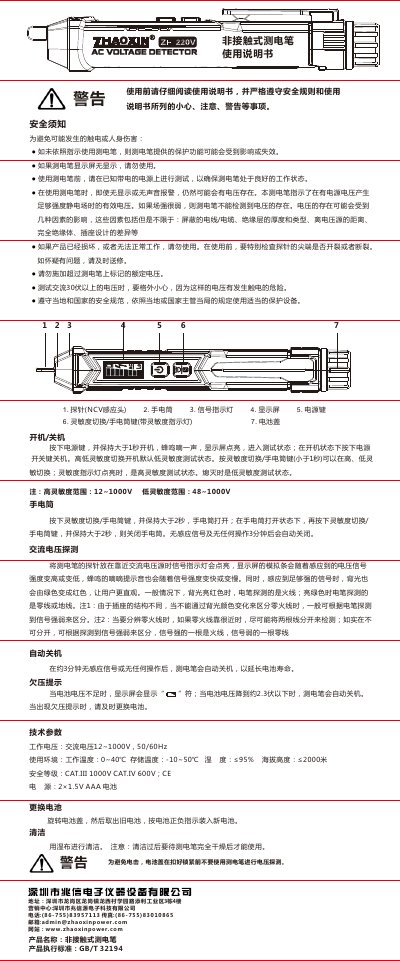
This manual describes a non-contact electric pen for detecting AC voltage without touching the conductor. It explains safety precautions, operating controls, sensitivity settings, flashlight use, and automatic power-off behavior.
The document also lists technical parameters, battery replacement steps, cleaning instructions, and a numbered parts diagram for the pen. This manual is written in Chinese.
| Working voltage | AC 12-1000 V, 50/60 Hz |
|---|---|
| High sensitivity range | 12-1000 V |
| Low sensitivity range | 48-1000 V |
| Operating temperature | 0 to 40 C |
| Storage temperature | -10 to 50 C |
| Altitude | <=2000 m |
| Safety rating | CAT III 1000 V, CAT IV 600 V; CE |
| Power supply | 2 x 1.5 V AAA batteries |
| Auto power off | About 3 minutes with no signal or operation |
| Low battery threshold | About 2.3 V |
Press and hold the power key for more than 1 second to turn it on; press the power key again while it is on to turn it off.
Press the sensitivity/flashlight key for less than 1 second; the sensitivity indicator lit means high sensitivity and off means low sensitivity.
Press and hold the sensitivity/flashlight key for more than 2 seconds to turn the flashlight on; press and hold it again for more than 2 seconds to turn it off.
The display shows a low-battery symbol, and the pen turns off automatically when battery voltage drops below about 2.3 V.