
Humming Probe 蜂鸟探针 酸碱检测系统 UX200 User Manual, includes product introduction, product description, product, accessories and function keys, power on main screen & setting menu instructions, computer connection operation instructions, select detection slot mode, pH measurement, etc.
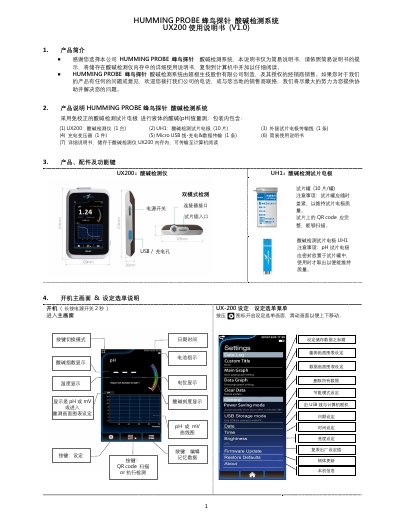
This is the V1.0 simple user manual for the Humming Probe (蜂鸟探针) UX200 pH detection system, made by 超极生技股份有限公司. It introduces the instrument and its UH1 calibration-free pH test strip electrodes, lists the package contents, and describes the keys, connectors and on-screen elements of the main measurement screen.
The manual then walks through the setup menu, connecting the UX200 to a computer over USB to copy out the detailed manual, choosing between Strip Port and Cable Socket detection modes, and the step-by-step pH measurement routine with QR code batch scanning, live pH, mV and temperature readings and the stability indicator. A one-year warranty statement closes the document. This manual is written in Chinese.
| Measurement parameters | pH, mV and temperature |
|---|---|
| Electrode type | Calibration-free pH test strip electrode |
| Included electrode strips | UH1, 10 strips per can |
| Charging / data connection | Micro USB cable |
| Warranty period | One year from purchase |
Press and hold the power switch for 2 seconds to enter the main screen.
Connect the UX200 to a computer with the USB cable; a UX200 DISK drive appears in the computer's file manager and contains UX200_中文使用说明书.pdf, which you can copy and read.
Long-press the icon in the upper left corner of the main screen, then select Cable Socket or Strip Port on the selection screen.
The number before # is the batch number and the number after # is the number of unused strips left in that can, decreasing by one with each insertion and removal.