
This manual introduces how to use BEI Precision's Encoder Test Box to calibrate, test, and evaluate nanoSeries® absolute optical encoders.
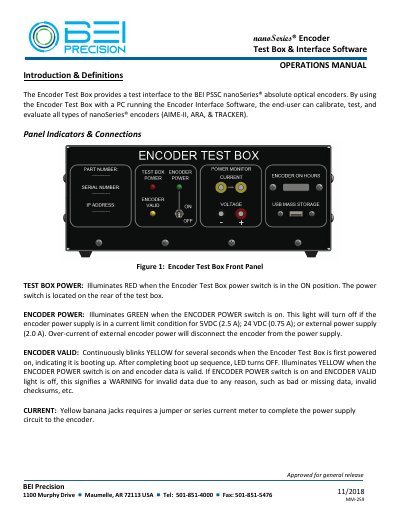
The BEI Precision nanoSeries Encoder Test Box & Interface Software Operations Manual describes a test interface for BEI PSSC nanoSeries absolute optical encoders. It covers the front and rear panel indicators and connections, UUT connections, and setup steps for connecting the test box to a Windows based PC over Ethernet.
The manual explains installing the 300-0639 Encoder Interface Software, starting the program and connecting to the encoder, using the position display and strobe rate controls, sending commands, and performing full calibration. It lists power and current limits and notes calibration rotation requirements for AIME-II, ARA, and TRACKER encoders.
| Encoder power current limits | 5 VDC: 2.5 A; 24 VDC: 0.75 A; external: 2.0 A |
|---|---|
| External power input range | +5 VDC to +36 VDC |
| PC connection | Ethernet |
| Accuracy tester output | 32-bit parallel encoder position output |
| Interface software | 300-0639 Encoder Interface Software |
It provides a test interface for BEI PSSC nanoSeries absolute optical encoders and lets the user calibrate, test, and evaluate AIME-II, ARA, and TRACKER encoders.
Connect an Ethernet cable from a Windows based PC to the ETHERNET connector on the back of the test box.
If the external power option is wired, the encoder can be supplied with +5 VDC to +36 VDC.
AIME-II completes calibration in 1 revolution.