
This quick start guide introduces the installation and connection methods of EA7E touch panel.
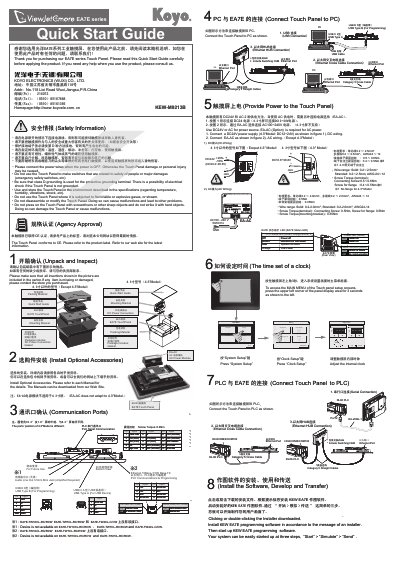
This Quick Start Guide covers the Koyo EA7E series Touch Panel. It describes unpacking and inspection, package contents, and how to provide power using DC24V or the optional EA-AC AC power module. It also shows how to connect the touch panel to a PC or PLC using serial, Ethernet, or USB connections.
Users can open the MAIN MENU by pressing the upper left corner of the display for 3 seconds and adjust the internal clock through System Setup. The guide includes safety warnings, such as using class D grounding and avoiding disassembly, and notes that the panel conforms to CE.
| AC Input | AC100 - 240 V 50/60 Hz |
|---|---|
| DC Input | DC20.4~28.8V / DC24V +20% -15% |
| 4.3 inch Model DC Input | DC12~24V |
| Wire Range | Solid: 0.2-2.0mm², Stranded: 0.2-2.0mm², AWG24-14 |
| Terminal Screw Torque | 0.5Nm |
| Mounting Bracket Torque | 0.35Nm |
| Ethernet | 10Base-T/100 Base-TX |
Press the upper left corner of the panel display area for 3 seconds.
Use DC24V or AC power; the EA-AC option is required for AC power.
The touch panel conforms to CE; refer to the product label for details.