
KCC gateway product introduction, which can integrate and interconnect multiple systems/devices through serial port or network, has rich hardware interfaces and strong computing power, adopts industrial grade chip and design, stable and reliable, and can be upgraded and customized according to actual needs to achieve true intelligent solutions.
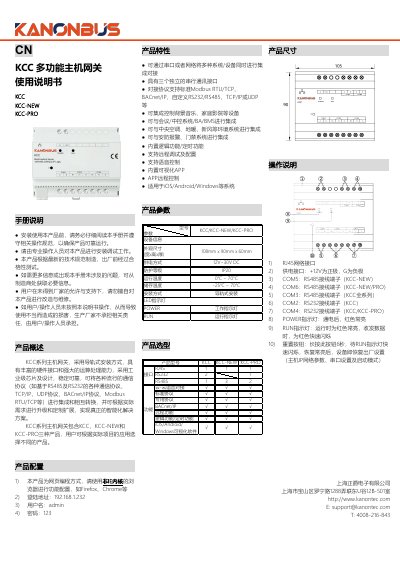
The KCC series is a rail-mounted multi-function host gateway with industrial-grade design. It integrates and converts communication protocols such as RS485/RS232-based protocols, TCP/IP, UDP, BACnet/IP and Modbus RTU/TCP, and can be upgraded or customized for intelligent solutions. The series includes KCC, KCC-NEW and KCC-PRO models.
Configuration is web-based and requires a non-IE browser. The manual covers product features, parameters, selection, dimensions, operation, device information and LED indicators. Default network login is 192.168.1.232 with username admin and password 123. This manual is written in Chinese.
| Dimensions (W x H x D) | 108mm x 90mm x 60mm |
|---|---|
| Power supply | 12V~30V DC |
| Serial communication interfaces | Three independent serial communication interfaces |
| Web configuration address | 192.168.1.232 |
| Default credentials | Username admin, password 123 |
| Supported protocols | Modbus RTU/TCP, BACnet/IP, TCP/IP, UDP, custom RS232/RS485 |
The default login address is 192.168.1.232.
The default username is admin and the default password is 123.
Long-press the reset button for 6 seconds until the RUN LED flashes rapidly and then returns to solid.
Use a non-IE browser such as Firefox or Chrome.