
This chapter introduces how to invite suppliers in myOEKO-TEX®, including searching for suppliers, sending and confirming supplier invitations, and viewing supplier certificates.
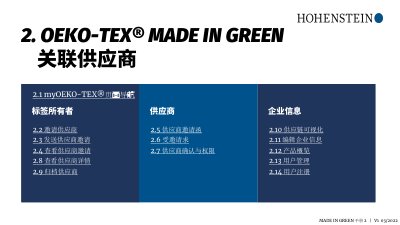
This is section 2 of the MADE IN GREEN manual (version V1 03/2022) for the myOEKO-TEX® web portal. It explains how a tag owner uses the portal's general menu to manage company information and suppliers, and describes the supplier management area: searching for suppliers, sending and confirming supplier invitations, and viewing supplier certificates.
The guide walks through inviting a supplier in three ways (by certificate or label number, by company name, or from an automatically generated alternative supplier list), sending and resending the invitation, what the supplier receives by email, and how invited users register. It also covers the product overview, where existing OEKO-TEX certificates and MADE IN GREEN labels are listed, and user management for adding new users to the company's myOEKO-TEX account. This manual is written in Chinese.
The guide lists three ways: by certificate number, by company name, or from the alternative supplier list.
The supplier receives an invitation email from [email protected] and then logs in or registers a myOEKO-TEX account.
After receiving the confirmation email, the user clicks “完成注册” within 24 hours, enters a new password and sets it.
A resend icon appears in the sent requests list one hour after the request was sent.