
This is a set-top box setup guide, including front and rear panel and interface instructions.
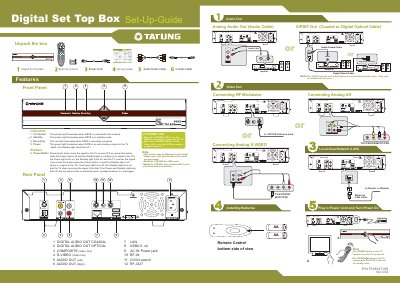
This two-page set-up guide from Tatung covers the Digital Set Top Box (DSTB), models STB-5000 with an internal HDD and STB-5001 without one. It walks through unpacking the box and identifying the front panel indicators (Connected, Standby, Recording, Power) and the Power button, then describes the rear panel jacks: coaxial and optical digital audio out, composite and S-Video video out, left/right audio out, LAN, two USB 2.0 ports, AC IN, RF-IN, a CH3/4 switch and RF-OUT.
Connection sections show how to hook the box to a TV, VCR, DVR, MCPC or PVR, to an amplifier over analog, coaxial or optical audio, and to a router or modem over Ethernet, along with installing the remote control batteries and turning the power on. A troubleshooting section gives step-by-step fixes for Ethernet connection, missing video and power problems, followed by safety information, maintenance and cleaning notes, AC power safety warnings and the FCC interference statement. The guide notes that the S/PDIF coaxial and optical jacks are not functional at this time.
| Model with internal HDD | STB-5000 |
|---|---|
| Model without internal HDD | STB-5001 |
| Digital audio outputs | Coaxial and optical (S/PDIF), not functional at this time |
| Video outputs | Composite (Video Out) and S-VIDEO (Video Out) |
| Analog audio outputs | AUDIO OUT (Left) and AUDIO OUT (Right) |
| USB ports | USB2.0 x2 |
| Network | LAN (Ethernet) |
| RF connections | RF-IN, CH3/4 switch, RF-OUT |
| Box contents | Digital Set Top Box, Remote Control, Power Cord, Set-Up-Guide, Audio/Video Cable, S-Video Cable |
It covers Model No. STB-5000, which has an HDD inside, and Model No. STB-5001, which does not have an HDD inside.
Check that the cable is connected properly between the router and the Ethernet jack on the back of the box, use a straight-through (not crossover) cable such as CAT5, CAT5e or CAT6, and reset the router and modem.
No. The guide states the S/PDIF (coaxial and optical) jacks are not functional at this time and may be enabled in the future.
The amber Standby light illuminates when the DSTB is in standby mode.