
TF-CNU/TF-FNU is a new generation of LED display control card for multi-area arbitrary partition, network, serial port and U disk communication
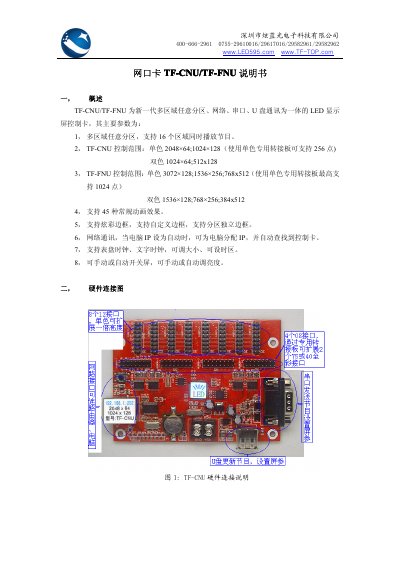
This manual describes the TF-CNU and TF-FNU LED display control cards, including their overview, hardware connection diagrams, software installation, IP configuration, screen parameter settings, program editing and sending, network troubleshooting, and physical and electrical parameters.
It also documents control ranges, supported animation effects, clock and brightness functions, serial-port and USB-disk IP changes, and network LED status indicators. This manual is written in Chinese.
| TF-CNU control range | Monochrome 2048x64; 1024x128; color 1024x64; 512x128 |
|---|---|
| TF-FNU control range | Monochrome 3072x128; 1536x256; 768x512; color 1536x128; 768x256; 384x512 |
| Supported animation effects | 45 conventional animation effects |
| Default IP address | 192.168.1.252 |
| PCB length | TF-CNU: 110 mm; TF-FNU: 105 mm |
| PCB width | TF-CNU: 80 mm; TF-FNU: 90 mm |
| Mounting hole horizontal spacing | TF-CNU: 100 mm; TF-FNU: 95 mm |
| Mounting hole vertical spacing | TF-CNU: 60 mm; TF-FNU: 60 mm |
| Normal operating current | 200 mA to 500 mA |
| Operating temperature range | -20 C to 60 C |
| Operating humidity range | Relative 0 to 85% (no condensation) |
The default IP address is 192.168.1.252.
The software version must be greater than 2.30.