
This document is the user manual for Bluetooth R Smart Lock DP151. It introduces how to install batteries, install apps, search devices and connect devices.
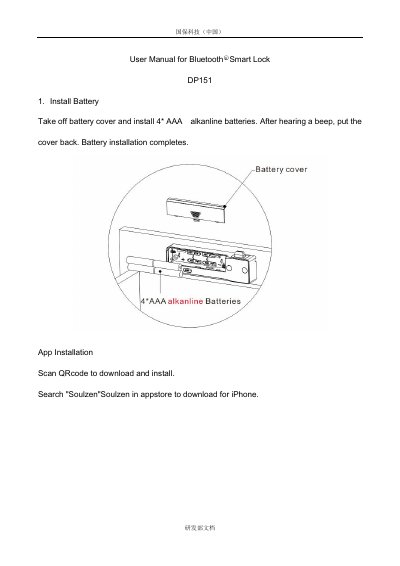
This manual provides instructions for the Soulzen DP151 Bluetooth Smart Lock. It details the installation of AAA batteries and the process for downloading and installing the companion mobile application. The guide explains how to pair the lock with a smartphone and navigate the app's homepage to manage device settings. This manual is written in Chinese.
| Bluetooth Range | 10 meters |
|---|---|
| Max Bound Phones | three mobile phones |
| Unlocking Modes | Unlock Automatically, Slide to Unlock, Password Unlock |
The initial password is 000000.
Up to three mobile phones can be bound.
There will be three short beeps and a lower voltage alarm popup.