
This is a report, and the purpose of the report is to test the performance of a certain product.
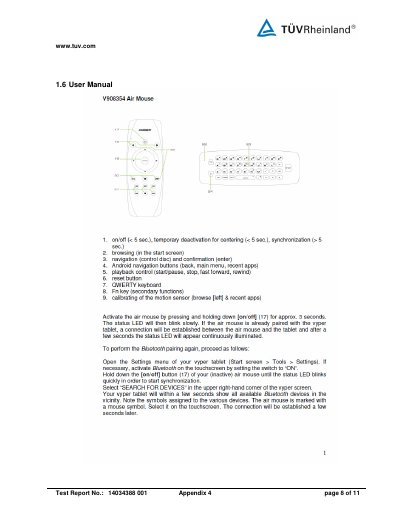
This document provides instructions for using the TUVRheinland V908354 Air Mouse, including how to pair it with a vyper tablet via Bluetooth. It details button functions for navigation, media control, and Android-specific features. The manual also covers calibration of the motion sensor, orientation adjustment, keyboard use, and battery charging.
Safety and regulatory compliance information is included, such as FCC and IC statements regarding interference and operation limits.
Open the Settings menu on your vyper tablet, activate Bluetooth, then hold the [on/off] button on the air mouse until the status LED blinks quickly. Select the air mouse (marked with a mouse symbol) from the device list on the tablet.
The air mouse’s sensors may need to be calibrated. Place it on a horizontal surface and hold down the [Browse (left)] and [Recent apps] buttons for two minutes. The status LED will blink rapidly during calibration.
Use the supplied AC adapter and USB cable, or connect it to any device with an active USB 2.0 port providing 500 mA (e.g., PC or Notebook). The LED will blink during charging and stop flashing when fully charged.