
This file is the repair parts and maintenance guide for Optima i.q.® EAF-150 faucet, including battery replacement method
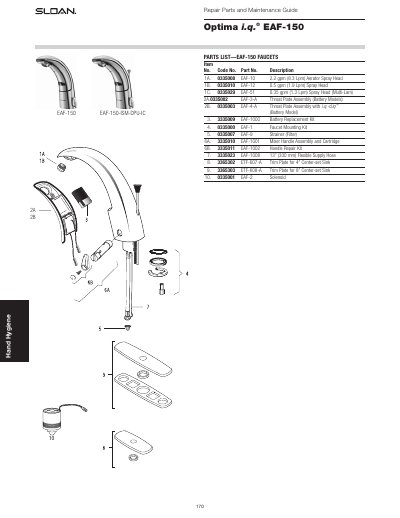
This guide provides a parts list for the Optima EAF-150 faucet, including aerators, throat plates, batteries, and hoses. It details how to replace the battery, adjust water range manually or automatically, and troubleshoot common issues like no water flow or continuous dripping. Cleaning instructions for chrome finishes are also included.
The guide covers battery replacement steps, manual range adjustment using LED flashes, and troubleshooting for problems such as sensor failure, clogged strainers, or incorrect water temperature. Contact information for Sloan Technical Support is provided for unresolved issues.
Close supply stop(s), remove throat plate, remove battery cover, dispose of old battery, wait 3 minutes, insert new 6V CR-P2 lithium battery, reinstall cover and throat plate.
Push button twice (double click), then push and hold for 5 seconds until LED flashes four times. Release button and wait 5 seconds. Hold button to cycle through five range settings: one flash = shortest, two = short, three = medium, four = long, five = longest. Release at desired setting.
Check if an adhesive label is covering the sensor eye and remove it. If not, check if the "Permanent Off" mode is activated and press the button once on the faucet throat.