
NC State Ethics Commission provides a User Guide to help users submit SEI.
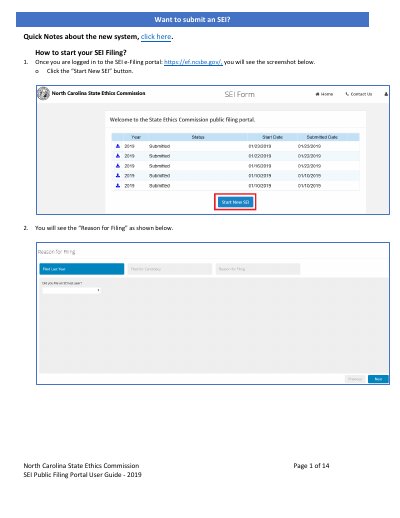
This document is a user guide for the North Carolina State Ethics Commission's SEI Public Filing Portal. It provides step-by-step instructions on how to start a new filing, navigate through various sections such as Reason for Filing, Filer Information, Family Information, Property Interests, Financial Interests, Professional and Civic Relationships, and Other Disclosures. The guide also covers adding attachments, submitting the form, and handling in-progress submissions.
The guide includes specific instructions on answering questions related to candidacy periods, serving on boards or commissions, and disclosing various interests. It also explains the system's functionality, such as saving in-progress forms, required fields, and the process for reviewing and submitting the completed SEI form.
No, attachments cannot be added once an SEI is submitted; this requires submitting an SEI Supplemental instead.
You will receive a message stating that you must correct all errors before proceeding.
The system retains the information you have filled in so far and allows you to resume by clicking a specific button.