
This document is a quick start guide to the PRO MP-6, which introduces the product's assembly and usage methods.
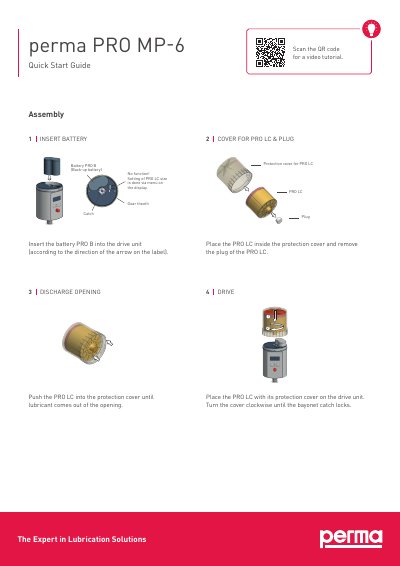
This guide explains how to install and configure the PRO MP-6 lubrication system. It covers inserting the battery, using the display controls, setting discharge periods, and activating outlets. The system displays remaining lubricant volume, temperature status, and configuration settings.
The PRO MP-6 includes a protection cover, discharge opening, and six outlets. Settings are managed via a menu on the display, with options for volume, discharge period, and outlet activation. Temperature warnings are indicated by an ice icon.
| Lubricant Volume | 250 or 500 cm³ |
|---|---|
| Temperature Warning | Below 0°C/32°F (blinking) or below -20°C/-4°F (permanent) |
| Display Function | Remaining volume, discharge period, outlet no., PIN, and malfunction codes |
Insert the battery PRO B into the drive unit according to the arrow on the label.
Activate outlets via the configuration menu; outlet 1 and 2 can be turned on or off individually.
It indicates either that the temperature fell below 0°C/32°F (blinking) or that the system shut off due to low temperature (below -20°C/-4°F, icon permanent).