
TelNet UC-One Mobile Client (iOS) allows you to make, receive, transfer, and hang up calls, and view call history, listen to voice messages, and manage contacts.
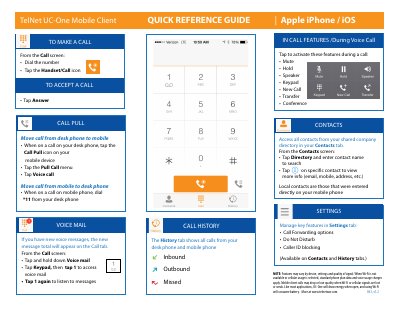
This quick reference guide describes the TelNet UC-One Mobile Client for Apple iPhone and iOS. It shows how to pull an active call from a desk phone to the mobile device, move a call back to the desk phone by dialing *11, make a call from the Call screen, and answer an incoming call.
The guide also covers the History tab for desk phone and mobile calls, voicemail access from the Call screen, the shared company directory in the Contacts tab, in-call features such as mute, hold, speaker, keypad, new call, transfer and conference, and the Settings tab for call forwarding, do not disturb and caller ID blocking. A note states that features may vary by device, settings and signal quality, and that standard plan data and voice charges apply when Wi-Fi is not available or cellular usage is selected.
| Supported platform | Apple iPhone / iOS |
|---|---|
| Document version | R61, v1.2 |
While on a call on your desk phone, tap the Call Pull icon on your mobile device, tap the Pull Call menu, then tap Voice call.
While on a call on the mobile phone, dial *11 from your desk phone.
From the Call screen, tap and hold down Voice mail, tap Keypad, then tap 1 to access voice mail and tap 1 again to listen.
Open the Contacts tab, tap Directory and enter the contact name to search.