
This is a technical data manual that introduces the wiring instructions of the WSP-2718-D Satellite Panel Dimming Option
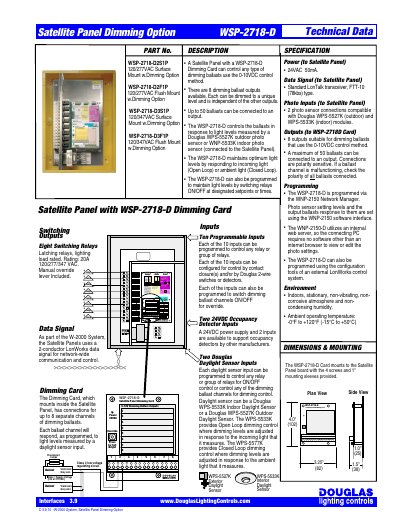
The WSP-2718-D is a Satellite Panel Dimming Card in the Douglas W-2000 System. It provides eight 0-10VDC dimming ballast outputs, each independent and able to connect up to 50 ballasts, and it responds to light levels from Douglas WPS-5527K outdoor or WPS-5533K indoor photo sensors.
The document gives technical data, wiring connections, and installation notes. The card uses 24VAC 50mA power, a standard LonTalk FTT-10 (78kbs) data signal, and is programmed through the WNP-2150 Network Manager or an external LonWorks control system; it mounts to the Satellite Panel board with four screws and 1-inch mounting sleeves.
| Power (to Satellite Panel) | 24VAC 50mA |
|---|---|
| Data Signal | Standard LonTalk transceiver, FTT-10 (78kbs) type |
| Dimming Outputs | 8 outputs for 0-10VDC dimming ballasts |
| Maximum Ballasts per Output | Up to 50 ballasts |
| Switching Relay Rating | 20A 120/277/347 VAC |
| Ambient Operating Temperature | -0°F to +120°F (-15°C to +50°C) |
Dimming ballasts that use the 0-10VDC control method.
Up to 50 ballasts can be connected to an output.
It is programmed via the WNP-2150 Network Manager or the configuration tools of an external LonWorks control system.
Douglas WPS-5527K outdoor and WPS-5533K indoor photo sensors.