
This is a hidden camera disguised as a table clock, which can record high-definition videos.
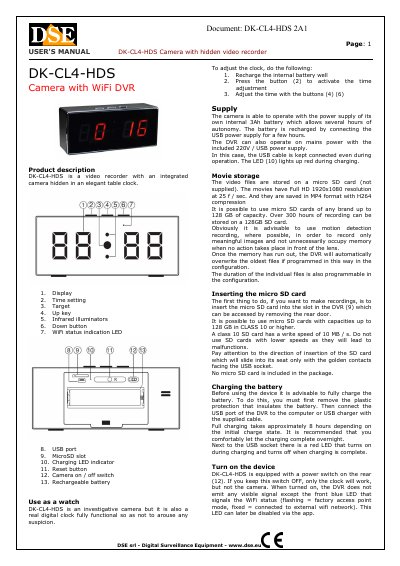
The DSE DK-CL4-HDS 2A1 is a covert video recorder integrated into a functional table clock. It records Full HD 1080p video at 30 fps to a microSD card (up to 128 GB) and features WiFi connectivity for remote control via the HDSmartIPC app on Android or iOS. The device includes invisible IR illumination up to 10 meters, a built-in microphone and speaker, and operates on a rechargeable 3Ah battery or mains power via USB.
The manual details clock setting, battery charging, microSD card insertion, power switching, app installation and configuration, IR and audio controls, factory reset procedure, and playback of recordings on a PC using a card reader. Technical specifications list sensor type, resolution, frame rate, video format, storage capacity, operating temperature, and memory requirements.
| Sensor | CMOS |
|---|---|
| Maximum resolution | FullHD 1080p (1920x1080) |
| Frame rate | 30 f/sec |
| Video format | MP4 (H264 compression) |
| Photo format | JPG |
| Overlay | Date time (not excludable) |
| Recording functions | Continuous, Motion, Timer, Live viewing |
| WiFi control range | 10 m |
| Audio microphone | Incorporated |
| Audio speaker | Incorporated |
| IR illuminator | Invisible, 10 m range |
| Video storage capacity | About 300 hours on 128GB at 1080P |
| Operating temperature | -5 °C to +40 °C |
| Memory type | MicroSD Class 10 or higher |
| Memory capacity | 4 to 128 GB |
Press button (2) to activate time adjustment, then use buttons (4) and (6) to adjust the time.
The device supports microSD cards up to 128 GB, Class 10 or higher.
Press and hold the reset button for 10 seconds using a thin object like a paperclip.
No, the USB cable is only for charging and power; files must be accessed by removing the microSD card and using a card reader.