
HyperDuo is a technology provided by Marvell, which allows users to use one SATA hard disk and one SSD to form a virtual hard disk, using the SSD's fast read and write and HDD's large capacity to achieve the advantages of both.
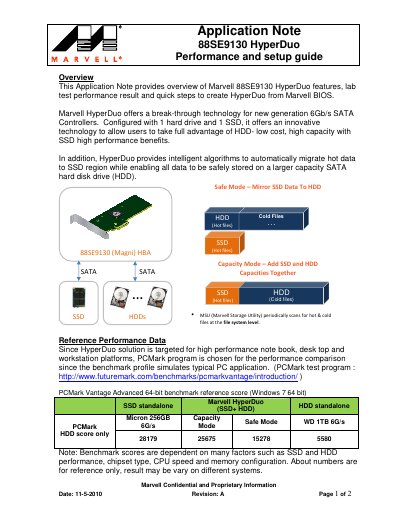
This document explains how to set up Marvell's HyperDuo technology using a single HDD and SSD. It details performance benchmarks and step-by-step BIOS configuration for creating HyperDuo in Safe or Capacity modes. The technology combines HDD capacity with SSD speed and includes intelligent data migration.
HyperDuo offers two modes: Safe Mode, which mirrors data for protection but reduces performance, and Capacity Mode, which combines capacities without mirroring for optimal speed. The setup requires BIOS access and may involve background data sync, which affects performance temporarily.
| Controller Model | 88SE9130 |
|---|---|
| Target Platforms | Notebook, Desktop, Workstation |
| Performance Benchmark | PCMark Vantage Advanced 64-bit |
| Default Mode | Safe Mode |
Connect one HDD and one SSD, enter Ctrl_M during POST, select 'HBA 0: Marvell 0', choose 'Configuration Wizard', select both devices, choose 'Safe' or 'Capacity' mode, and confirm creation.
No, the inbox AHCI driver is automatically loaded by Windows OS supporting AHCI.