
This guide provides instructions on how to install and use the Symantec VIP software through the Fairfax County government website.
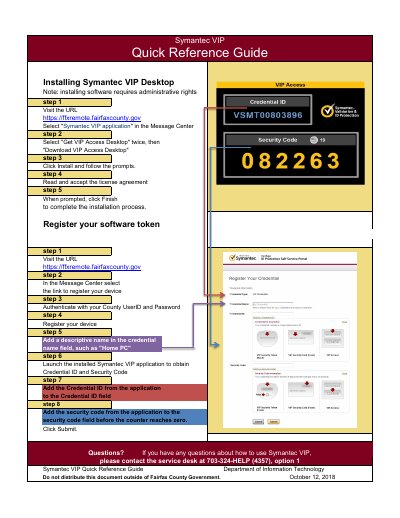
This quick reference guide from the Fairfax County Department of Information Technology walks through installing Symantec VIP Access Desktop and registering a software token. It notes that installing the software requires administrative rights.
The guide lists the installation steps in sequence (visiting the URL, selecting the application link, downloading, installing and accepting the license agreement), then the registration steps for naming and registering a device using the Credential ID and Security Code from the Symantec VIP application. A service desk number is given for questions.
Yes. The guide notes that installing the software requires administrative rights.
Add a descriptive name in the credential name field, such as "Home PC".
Launch the installed Symantec VIP application to obtain the Credential ID and Security Code, and enter the code before the counter reaches zero.
Contact the service desk at 703-324-HELP (4357), option 1.