
nSolver 4.0 Quick Start Guide is designed to direct you through the steps of importing, processing, exporting, and analyzing your nCounter data in nSolver version 4.0 and later. While this guide is appropriate for all analyte types and combinations, more detailed information may be needed and is available in the nSolver 4.0 User Manual. All About SNV Analysis, All About Fusion Analysis, and All About PlexSet Analysis guides are also available.
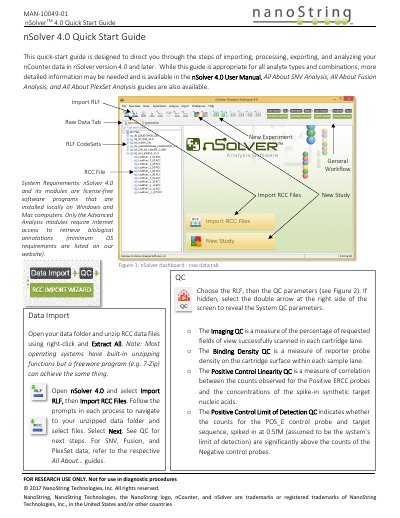
This document serves as a quick-start guide for the nSolver 4.0 software, designed to direct users through the steps of importing, processing, exporting, and analyzing nCounter data. It covers workflows for SNV, Fusion, and PlexSet data types, though it notes that more detailed information is available in the full User Manual and specific 'All About' guides.
The software is designed for research use only and is not intended for diagnostic procedures.
The software is installed locally on Windows and Mac computers.
The limit of detection is assumed to be 0.5fM.