
This document is the user manual for the RAZOR WALKIE TALKIE. It introduces the product's features and characteristics, including appearance, functions, and usage methods.
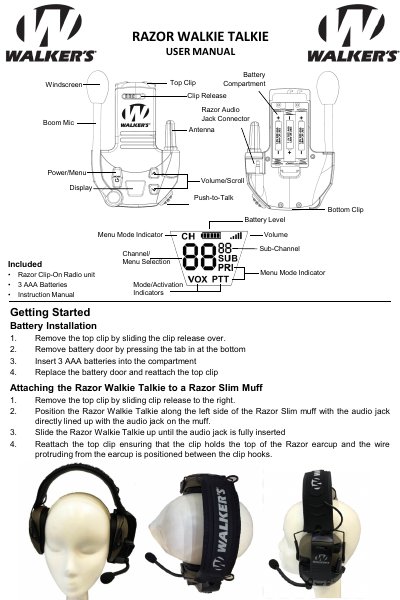
This manual explains how to install batteries, attach the Walkie Talkie to a Razor Slim Muff, and operate the device. It covers channel selection, sub-channel use for multiple groups, VOX for hands-free operation, and priority channel settings for emergency alerts. The device supports GMRS/FRS channels 1–22 and includes FCC/IC compliance warnings for safe RF exposure.
Remove the top clip, press the tab at the bottom to open the battery door, insert 3 AAA batteries, then replace the door and reattach the clip.
Slide the top clip off, align the audio jack with the muff’s jack, slide it up until fully inserted, then reattach the clip so the wire is between the hooks.
It supports standard GMRS/FRS channels 1 through 22.
Press the Power/Menu button three times to enter the VOX menu, scroll to LO (low sensitivity), HI (high sensitivity), or OF (disabled), then press Power/Menu twice to exit.