
M70-D Digital Moisture Meter Instruction Manual, introduce the features and characteristics of the product
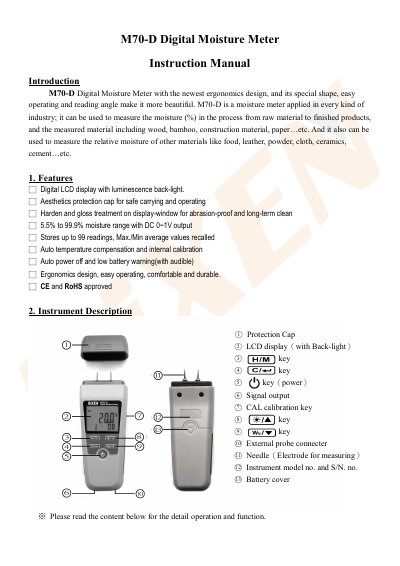
The M70-D is a digital moisture meter designed for industrial use, featuring an LCD display with backlight, auto temperature compensation, and a 5.5% to 99.9% moisture range. It supports memory storage of up to 99 readings with max/min/average functions and includes a calibration feature. The device is powered by a 9V battery and has a compact, ergonomic design for easy handling.
Operating instructions cover power management, measurement methods with or without extension probes, data recording, tree kind selection, backlight control, and calibration adjustments. Maintenance guidelines emphasize sensor care, battery replacement, and storage in dry conditions.
| Measuring Range | 5.5% to 99.9% H2O %WME |
|---|---|
| Resolution | 0.1% |
| Accuracy | ±1% (at 25℃) |
| Signal Output | DC 0~1V (10mV/%) |
| Data Memory | 99 readings |
| Power | One 9V (6F22) Battery |
| Operating Temperature | -20°C to +55°C |
| Dimensions | 153 x 56 x 32mm |
| Weight | 155g |
It can measure moisture in wood, bamboo, construction materials, paper, food, leather, powder, cloth, ceramics, and cement.
It stores up to 99 readings and allows users to recall max, min, average, or specific memory locations using dedicated keys.
To calibrate, turn on the instrument in calibration mode by holding and pressing the power key, then adjust using a small screwdriver on the 'CAL' setting.
It uses a 9V battery and provides approximately 250 hours of continuous use without backlight.