
ProPoint Kontour Rhythm mounting guide
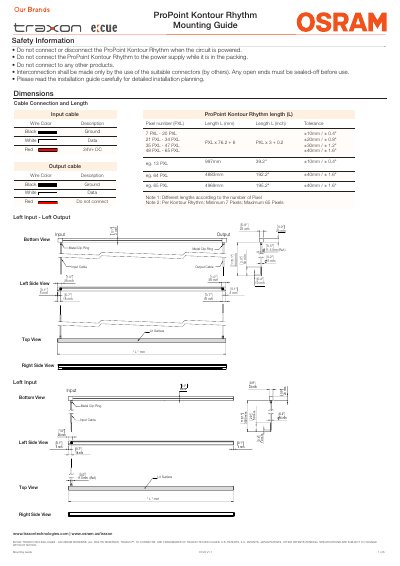
This document serves as a mounting guide for the Traxon Kontour Rhythm LED display. It provides critical safety information, physical dimensions, and specifications for input and output cables, including wire colors and length calculations based on pixel count. The guide also details mechanical constraints such as minimum bending radius and maximum twist angles to prevent cable damage during installation.
| Minimum Pixels | 7 Pixels |
|---|---|
| Maximum Pixels | 65 Pixels |
| Minimum Bending Radius | 24mm |
| Maximum Twist Angle | 360° per 1000 mm |
| Input Cable Length (7-20 PXL) | 21 PXL - 34 PXL |
The unit supports a minimum of 7 pixels and a maximum of 65 pixels.
The minimum bending radius of the cable must be 24mm.
One lock catch should be placed every 500mm / 20 inches.