
This document is a troubleshooting guide for Lippert Components Inc.'s In-Wall™ slideout product
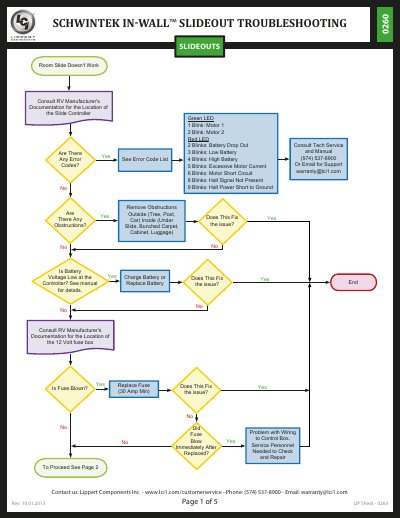
This guide provides step-by-step troubleshooting for the SchwinTek In-Wall™ Slideout system, including error code interpretation, fuse checks, obstruction removal, and manual override procedures. It covers common issues like motor failure, battery problems, and debris in gear racks. The guide also includes safety warnings and contact information for technical support.
The document includes diagrams and instructions for manual override using the circuit board, disengaging motors for manual retraction, and resetting error codes via the extend/retract switch.
| Minimum Fuse Rating | 30 amp |
|---|---|
| Low Battery Voltage Threshold | 8 volts |
| High Battery Voltage Threshold | 18 volts |
Battery drop out: Battery capacity low enough to drop below 6 volts while running.
Locate the circuit board, press the mode button six times quickly, then press a seventh time and hold for five seconds. The red and green LEDs will flash to confirm override mode.