
This is the user manual for JJC TM-Series Multi-Function Timer Remote Control
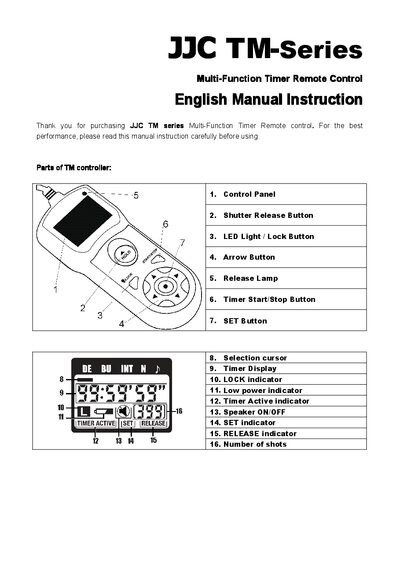
This manual introduces the JJC TM-Series timer remote control, describing its parts, safety precautions, battery replacement, and how to connect and disconnect the unit from a camera. It also explains how to set delays, bulb/long exposure, interval timers, and the number of shots.
Detailed sections cover automatic and manual function descriptions, timer setting using the arrow and SET buttons, speaker and release lamp behavior, LED lock button usage, and the device's physical specifications such as dimensions, weight, battery type, cord length and operating temperature.
| Dimensions | Approx 110 × 45 × 22 mm |
|---|---|
| Weight | Approx 72 g |
| Battery Type | 2 AAA or LR03 alkaline batteries |
| Length of cord | Approx 90 cm |
| Operating temperature | -20 °C to +50 °C |
Turn off both the camera and the controller, remove the remote socket cover, plug the controller into the camera’s remote socket, then turn both devices on.
Use the arrow buttons to select the desired number; press down for 1 (unlimited) or up to 399 shots, then press SET to confirm.
Press the LED Light / Lock Button for 1 second to turn on the LED lamp, or press it for 2 seconds to enable or disable the button lock.