
HILUX TO-DIM-LED 250 Din Rail Zigbee is a 5-250W LED dimmer that can be controlled remotely via Zigbee. The product has overheat, overload, and short-circuit protection.
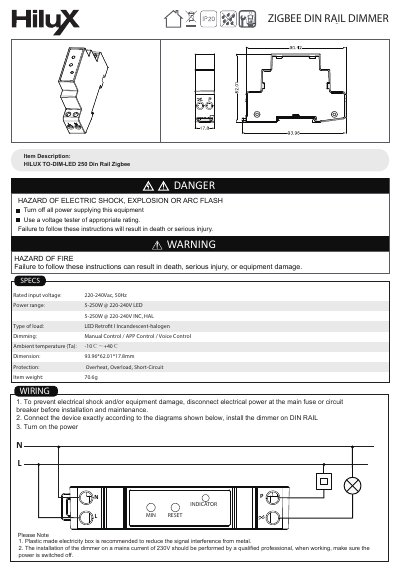
The document provides a user guide for the HILUX TO-DIM-LED 250 Din Rail Zigbee dimmer. It includes critical safety warnings regarding electrical hazards, fire risks, and proper installation procedures on DIN rails. The device supports various load types including LED, incandescent, and halogen bulbs with power ratings up to 250W.
| Rated input voltage | 220-240Vac, 50Hz |
|---|---|
| Power range (LED/Incandescent/Halogen) | 5-250W @ 220-240V |
| Type of load supported | LED, Retro-fit Incandescent-halogen |
| Ambient temperature range | -10 to +40 degrees Celsius |
| Dimensions | 93.96*62.01*17.8mm |
| Item weight | 70.6g |
The dimmer supports a power range of 5-250W at 220-240V.
Yes, the device supports Manual Control, APP Control, and Voice Control.
Press the reset button for 5 seconds until the indicator stays red for 10 seconds.
The device will switch off automatically and must be switched on again manually after cooling down.