
This is a user manual for a Nordtronic Zigbee wireless switch
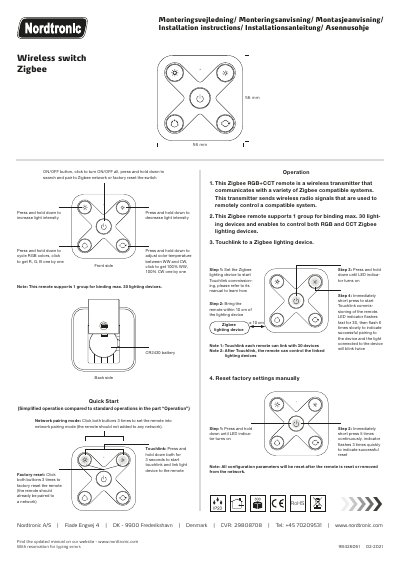
This manual describes the Nordtronic 98426061 Zigbee RGB+CCT wireless switch, a transmitter that communicates with compatible Zigbee systems to control lighting devices. The device supports one group for binding a maximum of 30 lighting devices and enables control of both RGB and CCT Zigbee lighting devices. It operates using a CR2430 battery and features an LED indicator for status updates.
| Supported systems | Zigbee compatible systems |
|---|---|
| Max binding devices | 30 |
| Supported device types | RGB and CCT Zigbee lighting devices |
| Battery type | CR2430 |
| Touchlink range | 10 cm |
Press and hold down the button until the LED indicator turns on, then click both buttons 3 times to factory reset the remote.
Each remote can link with a maximum of 30 lighting devices.
Press and hold down the button until the LED indicator turns on, then immediately short press to start Touchlink commissioning.