
This document is the instruction manual for the weather station, which introduces the function characteristics of the weather station, including indoor temperature, humidity display, outdoor temperature display, weather forecast icons and weather trend indicators, DCF-77 radio controlled clock and calendar display, etc.
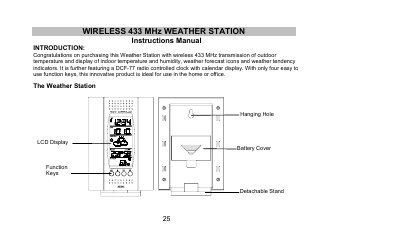
This manual provides instructions for the Weather Station 433 MHz, a wireless device that displays outdoor temperature and indoor temperature and humidity. It features a DCF-77 radio-controlled clock with calendar display, weather forecasting icons, and weather tendency indicators. The system supports up to three remote outdoor transmitters and allows for manual time settings if the radio signal is unavailable.
| Indoor/Outdoor Transmission Frequency | 433 MHz |
|---|---|
| Indoor Battery Type | 2 x AA, IEC LR6, 1.5V |
| Outdoor Transmitter Battery Type | 2 x AAA, IEC, LR3, 1.5V |
| DCF-77 Transmission Range | approximately 1,500 km |
| Maximum Remote Transmitters | 3 |
| Outdoor Transmission Range | no more than 25 meters |
The Weather Station can take up to three outdoor transmitters.
You should use the SET key to manually enter a time initially.
Press the IN key for over 3 seconds to reset the records.