
This manual describes the troubleshooting methods for in-wall slide-out, including checking battery, checking wiring, checking power supply, checking error codes, etc.
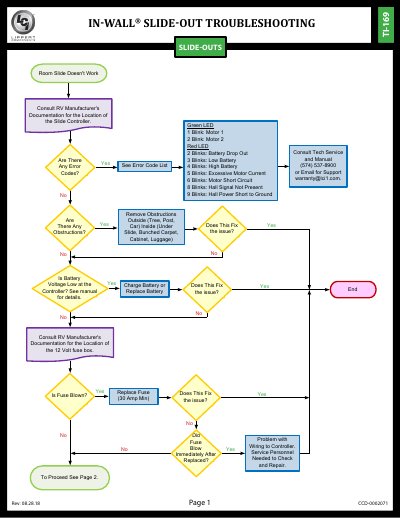
This document serves as a troubleshooting manual for the IN-WALL TI-169 slide-out system. It provides diagnostic steps for common issues such as the room not working, only one side moving, or wiring failures. The guide includes a detailed list of error codes indicated by LED blinking patterns and their corresponding causes, such as battery voltage issues or motor short circuits.
| Minimum Fuse Rating | 30 Amp |
|---|---|
| Low Voltage Operation Limit | 8 volts |
| Recommended Voltage Threshold | 11 volts |
| High Battery Voltage Limit | greater than 18 volts |
It indicates a battery drop out, meaning the battery capacity dropped below 6 volts while running.
It indicates a low battery condition where the voltage is below 8 volts at the start of the cycle.
Locate the circuit board, press the mode button six times quickly, then press and hold it for approximately five seconds until the LEDs flash.