
This is a quick reference guide for the SonoSite SII ultrasound system. It provides an overview of the system's features and how to use it.
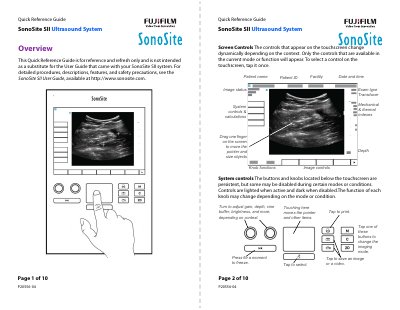
This document serves as a quick reference tool for the SonoSite SII Ultrasound System. It is intended for refreshment of knowledge rather than as a substitute for the full User Guide. The guide details the dynamic nature of touchscreen controls versus persistent physical buttons and knobs below the screen.
The text provides step-by-step instructions for essential tasks including installing batteries, connecting transducers, logging in, and performing various imaging modes such as 2D, M Mode, Color, and Doppler. It also covers procedures for freezing images, zooming, labeling studies, exporting data to USB memory sticks, and measuring distances or heart rates.
| Manufacturer | FUJIFILM SonoSite, Inc. |
|---|
The system starts in 2D mode.
Repeatedly tap the control button to switch it between Slow, Med, and Fast.
The default Doppler imaging mode is PW Doppler.